Nov 02, 202610 min readBy Aditya Singh
Buying a new Smart TV during Diwali can be confusing when every model comes with different specifications, display technologies, and features. You might find a 4K LED TV, a Cloud TV, a Google TV, and a webOS TV within the same price range, but their viewing experiences and capabilities can differ.
The important thing is to understand which specifications matter for your requirements. Screen size, resolution, panel technology, refresh rate, sound quality, operating system, and connectivity are some of the factors worth comparing.
This buying guide covers the essential things to consider before choosing a new Smart TV, helping you understand the features, compare available options, and make a more informed purchase.
Things To Consider Before Buying A Smart TV This Diwali
The best Smart TV for your home is one that matches your viewing habits, room size, and budget. A bigger screen or a longer feature list does not always mean a better choice. A few practical checks can help you compare models and identify the specifications that deserve your attention.
1. Choose The Right TV Screen Size For Your Room
The first decision is choosing a screen size that suits your room. A larger television can create a more immersive experience, but it should also match your viewing distance, available wall space, and seating arrangement.
Here are some common screen-size options and where they may fit:
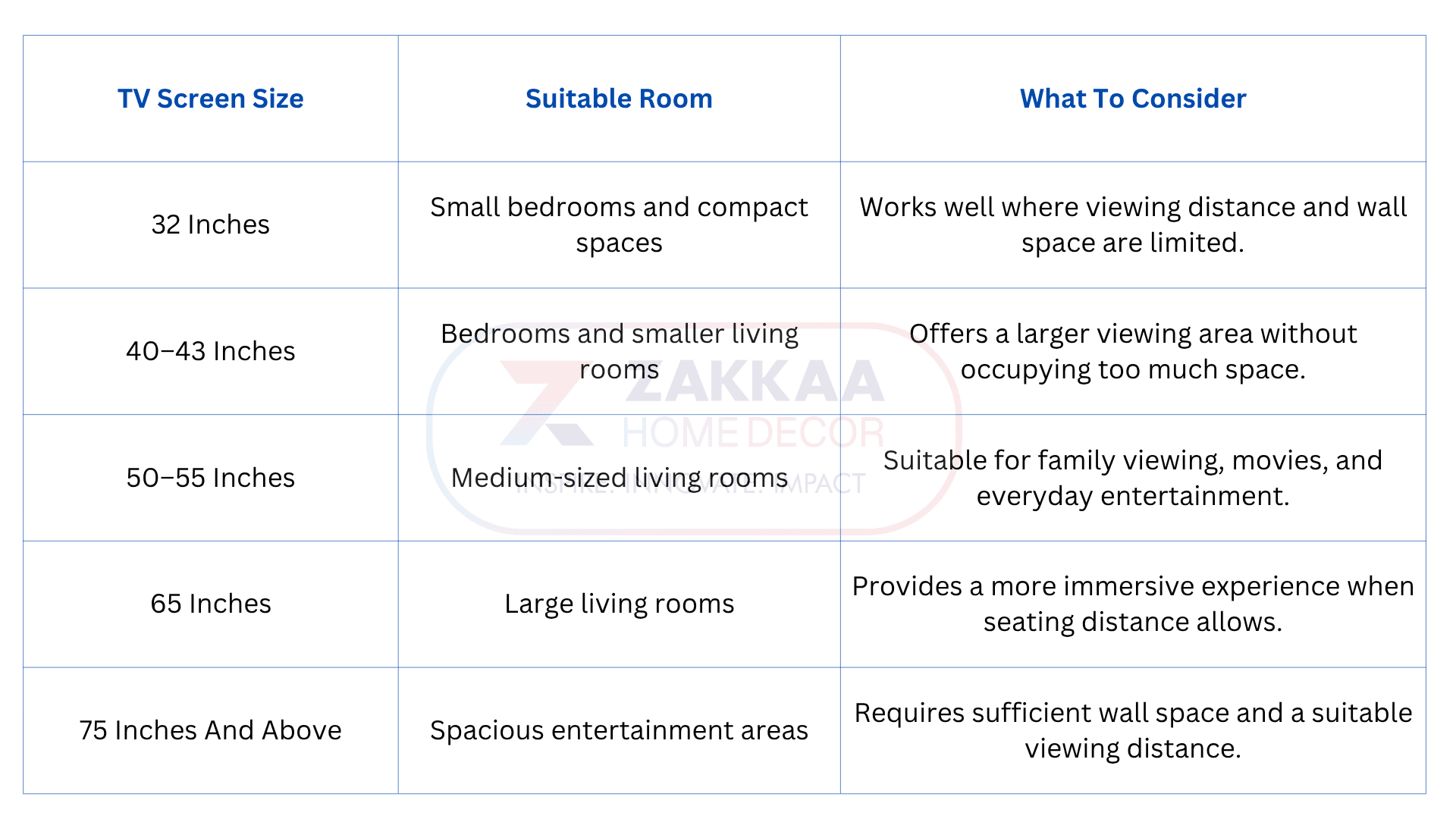
Buying Tip: Do not select a television based only on its advertised size. Measure the wall or TV unit, consider where viewers will sit, and check the manufacturer's recommended viewing distance.
2. Understand Television Picture Quality Before Buying
Picture quality has a major impact on movies, sports, gaming, and everyday television viewing. A television's display resolution is important, but other specifications also influence how images appear.
Consider these picture-quality features before making a purchase.
HD, Full HD, And 4K Resolution
Resolution refers to the number of pixels used to create an image. More pixels can provide greater detail, particularly on larger screens when the content is available in a suitable resolution.
HD: A practical option for smaller screens and basic viewing requirements.
Full HD: Offers more detail than standard HD and can suit everyday entertainment.
4K Ultra HD: Provides four times the pixel count of Full HD, making it a popular choice for larger screens and high-resolution content.
A 4K smart TV can be a good investment for households that regularly stream movies and shows in 4K. However, the actual picture quality also depends on the content, display panel, image processing, and viewing conditions.
High Dynamic Range (HDR) can improve the way a television displays bright and dark areas. Supported HDR formats and the TV's actual brightness and contrast capabilities influence the final result.
Refresh rate indicates how many times the screen updates each second. It is measured in hertz (Hz).
A higher refresh rate can provide smoother motion, particularly during fast-moving sports and compatible gaming content. Check the television's native refresh rate rather than relying only on motion-enhancement labels used in advertisements.
3. Compare Google TV And WebOS TV
The operating system determines how you navigate the television, access streaming services, discover content, and manage connected devices. Google TV and WebOS TV are two options buyers may encounter while comparing smart televisions.
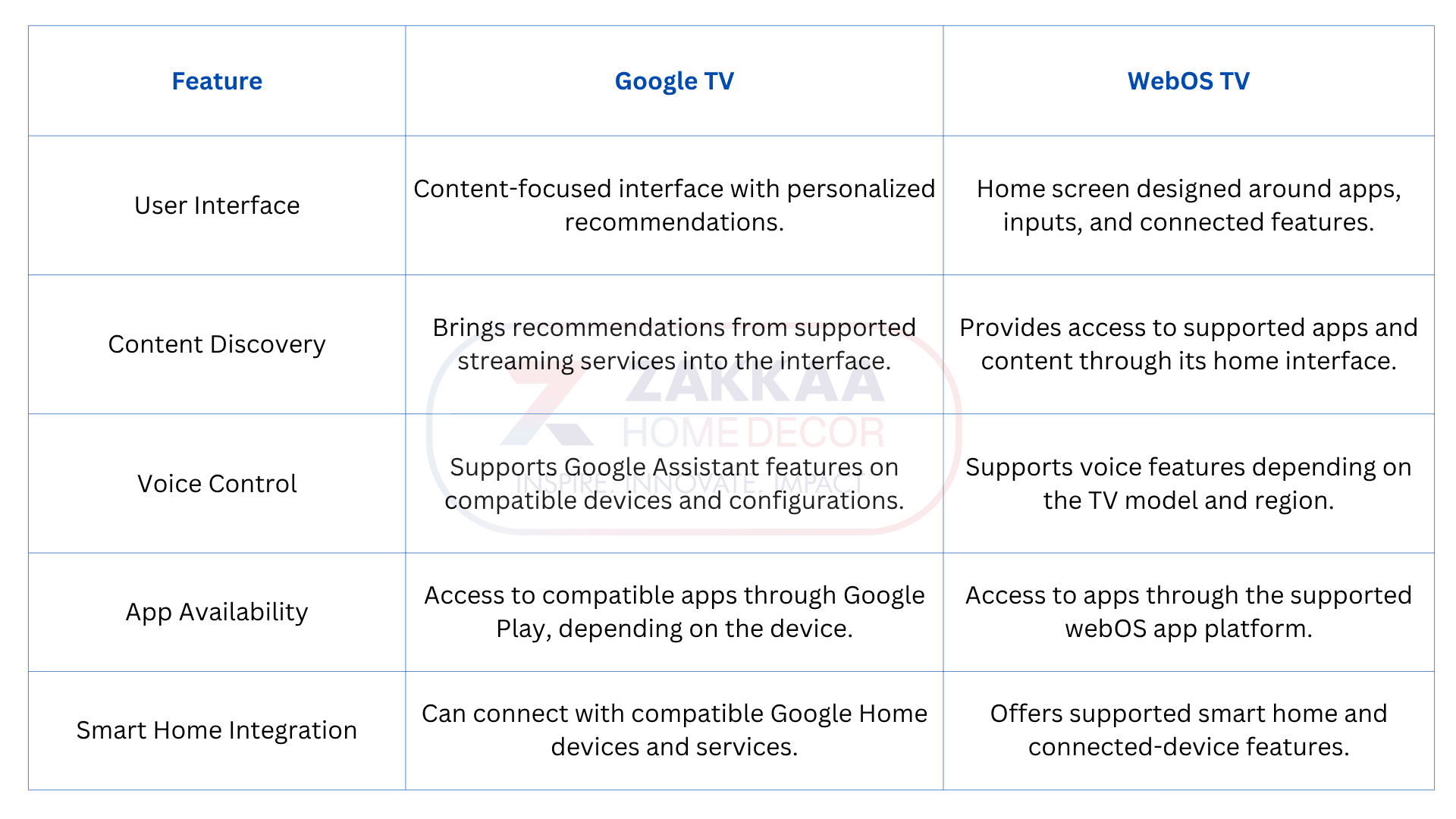
Which Operating System Should You Choose?
Choose Google TV if you prefer Google's content recommendations, compatible Google services, and an interface built around discovering entertainment.
WebOS TV may suit buyers who prefer its home-screen layout and supported connected-device features.
The best option depends on the television model, app availability, software version, and your existing devices. Check whether your preferred streaming services and applications are supported before purchasing.
4. Check Essential Smart TV Features
A smart television should make entertainment easier to access and manage. While comparing models, look beyond the number of pre-installed applications and consider how useful the features will be in everyday situations.
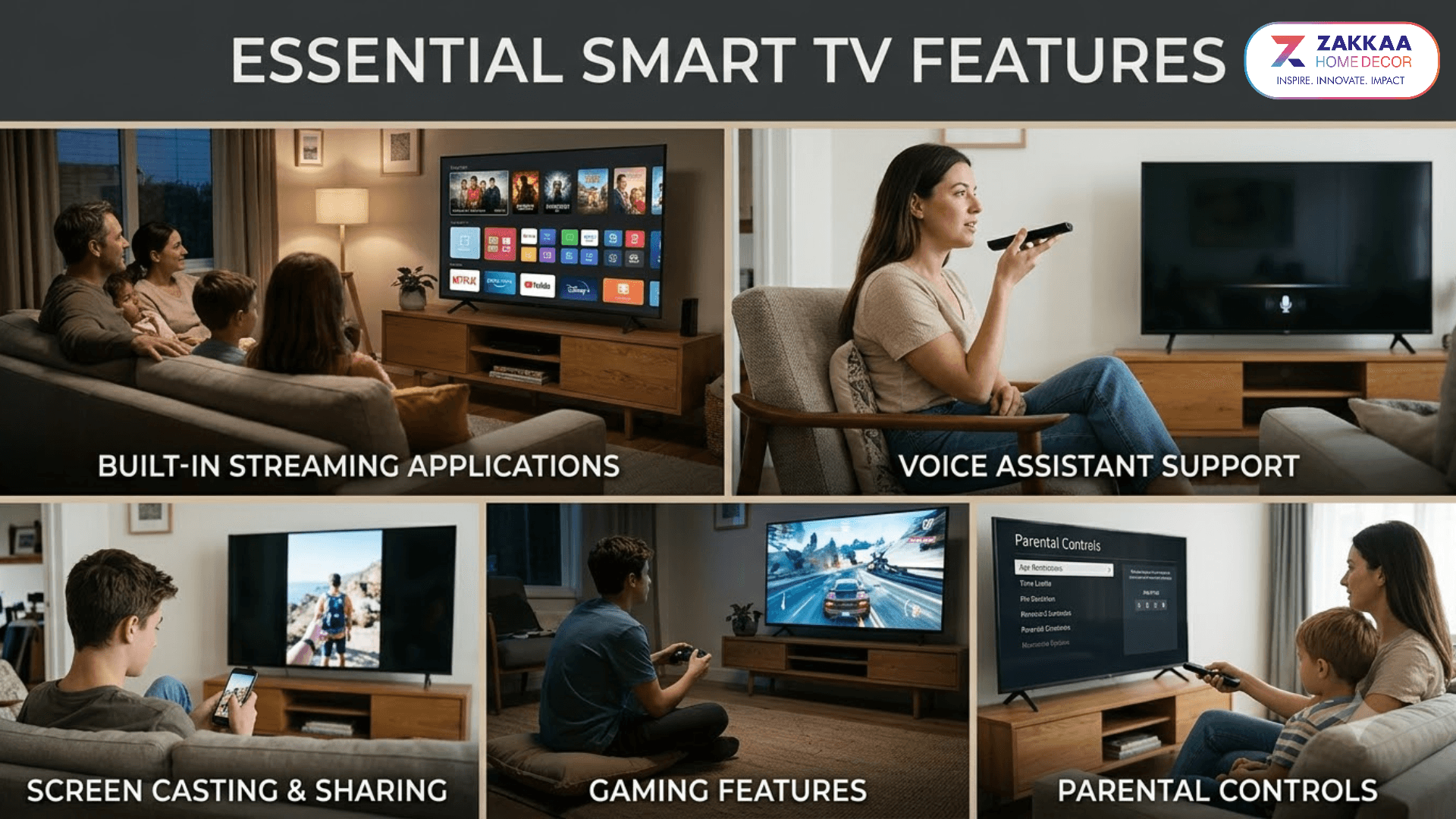
Built-In Streaming Applications
Check whether the television supports the streaming platforms your household uses. App availability can vary by operating system, region, and model, so verify the actual app list before buying.
Voice Assistant Support
Voice controls can help users search for content, open applications, and perform supported commands without navigating every menu manually. Check whether the TV has a built-in microphone, requires a remote-control button, or works with a separate compatible device.
Screen Casting And Sharing
Screen mirroring and casting allow compatible phones, tablets, or computers to display content on the television. This can be useful for sharing photographs, videos, presentations, and other supported content.
Gaming Features
If gaming is important, check for features such as low-latency settings, supported refresh rates, HDMI connectivity, and compatibility with your gaming console.
Parental Controls
Parental controls can help families manage access to supported content and applications. Check whether the television allows content restrictions, profile controls, or other family-friendly settings.
5. Don't Ignore Sound Quality While Buying An LED TV
An LED television may offer excellent picture quality, but poor sound can affect the overall entertainment experience. Built-in speakers are convenient for regular viewing, although their performance varies across models.
Consider these audio specifications:
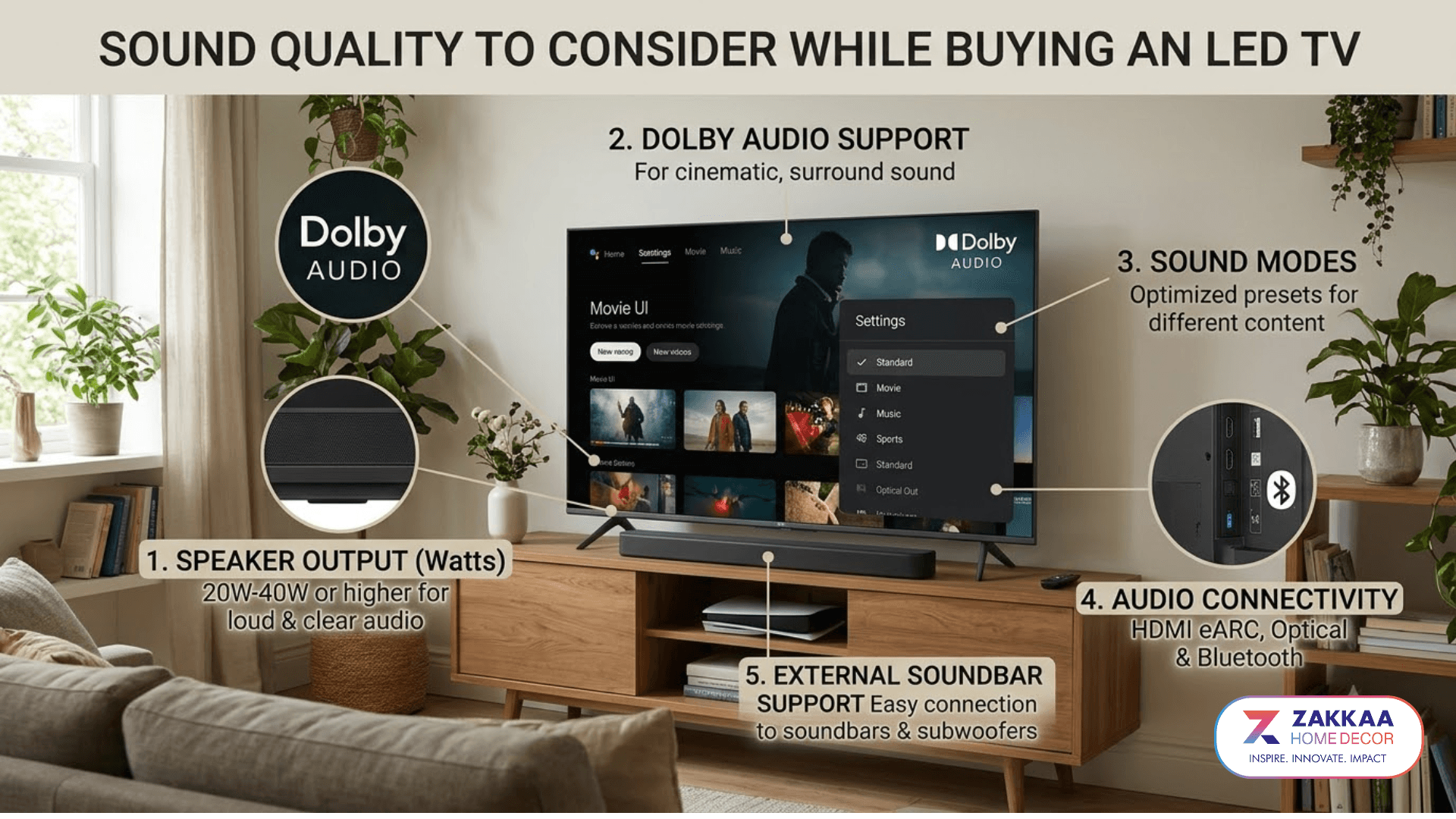
Speaker Output: Check the advertised speaker power and listen to the television at different volume levels.
Dolby Audio Support: Verify which supported audio formats are available on the model.
Sound Modes: Look for settings designed for movies, dialogue, sports, and music.
Audio Connectivity: Check whether the TV supports HDMI ARC or eARC, optical audio, or Bluetooth audio connections as required.
External Soundbar Support: Consider whether you may want to add a soundbar later.
For larger living rooms, an external sound system may provide a more immersive experience than built-in television speakers alone.
6. Check Smart TV Connectivity Options
Connectivity determines how easily your television works with the internet, gaming consoles, sound systems, storage devices, and other electronics.
Before finalizing your purchase, check these important options:
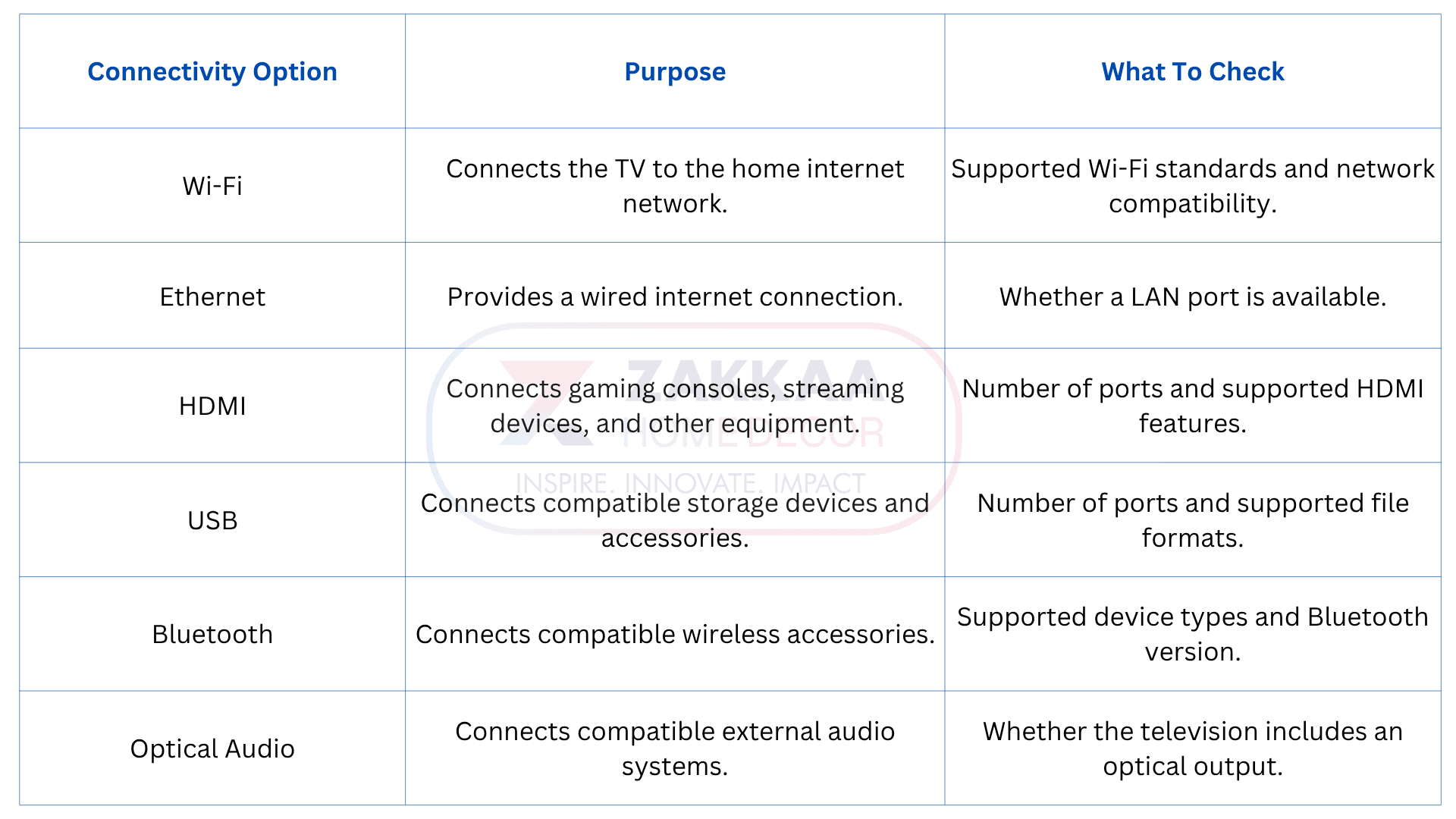
Buying Tip: Count the devices you plan to connect. If you use a gaming console, soundbar, set-top box, and streaming device, make sure the available ports can accommodate your setup.
LED TV Buying Tips: Features Worth Comparing
Two televisions with similar screen sizes and resolutions may deliver different viewing experiences. Compare the specifications that affect actual performance rather than selecting a model based only on its advertised feature count.
Panel And Display Technology
Check the display technology used in the model. LED televisions use LED backlighting with an LCD panel, while other technologies, such as OLED, use different display structures.
Compare brightness, contrast, viewing angles, and display performance based on your room's lighting conditions.
Brightness And Contrast
Brightness affects how clearly a screen appears in well-lit rooms. Contrast influences the distinction between dark and bright areas.
If your living room receives considerable daylight, consider a model with suitable brightness and anti-reflection performance.
Viewing Angles
If several family members watch television from different seating positions, viewing angles matter. Check whether colors and brightness remain acceptable when viewed from the sides.
Bezel And Design
A slim bezel can give the television a more contemporary appearance and help the screen stand out. Also check the stand design, wall-mounting compatibility, and overall dimensions.
Software Updates
Smart TV software affects application compatibility, security, and the user experience. Ask about the manufacturer's software support policy and check the model's current software version.
8. How To Make The Most of Festive Electronics Offers
Diwali electronics shopping often comes with promotional pricing, bundled accessories, bank offers, and exchange deals. However, a discount should not be the only reason to select a particular television.
Use these checks before making your purchase:
1. Compare Final Prices: Check the effective price after eligible discounts, exchange benefits, and bank offers.
2. Verify The Model Number: Make sure the advertised deal applies to the exact television model you want.
3. Check Warranty Coverage: Understand the warranty period and what it covers, including the panel and other components.
4. Ask About Installation: Confirm whether installation and wall-mounting services are included or charged separately.
5. Review Return Conditions: Understand the seller's replacement and return policies before completing the purchase.
6. Compare Accessories: Check whether the package includes the remote, stand, cables, and other advertised accessories.
A slightly more expensive television may offer better connectivity, a more suitable display, or longer-term convenience. Compare the complete package rather than focusing only on the headline discount.
Why Choose A Reliable LED TV Manufacturer In India?
A trusted LED TV manufacturer in India such as Zakkaa plays an important role in the television's design, assembly, testing, and product support. Whether you are purchasing a television for your home or evaluating products for business requirements, understanding the manufacturer's quality practices can help you make a better decision.
Look for these points:
Product Specifications: Clear details about display resolution, panel technology, connectivity, and smart features.
Assembly Quality: Proper fitting of the display, cabinet, internal components, and connectors.
Quality Testing: Checks for display performance, audio, ports, software operation, and other relevant functions.
Model Availability: Product options across suitable screen sizes and feature configurations.
Warranty Support: Clearly defined warranty terms and available service arrangements.
Product Documentation: Accurate information about operating systems, supported applications, accessories, and specifications.
For businesses exploring OEM or private-label television requirements, it is also important to discuss product configurations, component specifications, testing procedures, order quantities, and after-sales arrangements with the manufacturer.
Conclusion
A new smart TV can make your Diwali celebrations more enjoyable, whether you are watching movies with family, following festive programs, or hosting friends for an evening of entertainment. The right choice comes down to matching screen size, picture quality, operating system, sound, and connectivity with your household's needs.
Before taking advantage of festive electronics offers, compare the actual specifications, warranty, and installation arrangements. A well-chosen television should deliver more than a festive discount. It should remain a useful part of your home entertainment setup for years to come. You can explore television solutions and connect with a leading OEM manufacturer of TVs in India to discuss your smart TV or OEM requirements.
Frequently Asked Questions (FAQs)
Which Smart TV Is Best To Buy During Diwali?
The best smart TV depends on your budget, room size, viewing habits, and preferred applications. Compare screen resolution, operating system, sound, connectivity, and warranty before choosing a model.
Is A 4K Smart TV Worth Buying?
A 4K smart TV can be a good choice for larger screens and households that watch compatible high-resolution content. Its overall picture quality also depends on the display panel, brightness, contrast, and image processing.
Which Screen Size Is Suitable For A Living Room?
A 50- or 55-inch television may suit many medium-sized living rooms, while larger rooms may accommodate 65-inch or bigger models. The ideal size depends on viewing distance and available space.
Is LED TV A Good Choice For Home Entertainment?
LED TVs are widely used for everyday home entertainment and are available in different screen sizes, resolutions, and price ranges. Compare brightness, contrast, viewing angles, and other specifications before selecting a model.
How Can I Get The Best Deal During Diwali Electronics Shopping?
Compare prices across sellers, verify the exact model number, check eligible bank and exchange offers, and review warranty and installation terms. Focus on the final price and product specifications rather than the advertised discount alone.